

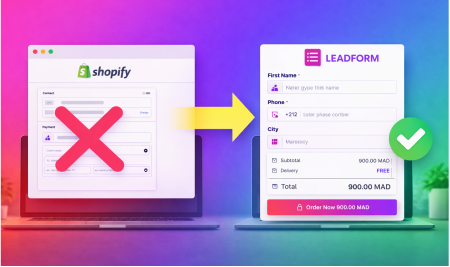
Why Shopify's Default Checkout Kills Your COD Conversion Rate (And What to Do About It)
Shopify's default checkout is one of the best-engineered checkout flows in ecommerce. For merchants selling to customers who pay by credit card, it is fast, trustworthy, and highly optimized.
But if your primary payment method is Cash on Delivery, the default checkout is actively working against you.
This is not a minor inconvenience. Merchants selling COD in markets like Morocco, Egypt, Algeria, Pakistan, and Nigeria are leaving a significant percentage of their sales on the table — not because their products are wrong or their ads are bad, but because their checkout was designed for a completely different type of buyer.
This article explains exactly why, and what to do about it.
The Default Shopify Checkout Was Not Built for COD Markets
Shopify is a Canadian company. Its default checkout was designed around the behavior and expectations of Western buyers who pay by card, trust online payment systems, and shop primarily on desktop or high-quality mobile connections.
COD buyers in emerging markets are different in every relevant dimension:
- They are predominantly on mobile, often on slower connections
- They do not trust — or do not have — online payment methods
- They are often first-time online buyers with high anxiety about the transaction
- They need reassurance that paying at the door is normal and accepted
- They are highly sensitive to friction, complexity, and anything that feels unfamiliar
The default checkout does not address any of these needs. It shows payment options the customer will never use. It requires information that is not relevant to COD transactions. It does not communicate what the COD process looks like. And on mobile — where the overwhelming majority of COD customers are shopping — it performs significantly worse than on desktop.
The Mobile Problem Is Bigger Than You Think
Mobile checkout abandonment in ecommerce sits at 85.65% — meaning that out of every 100 people who start the checkout process on mobile, only about 14 complete it.
That number is staggering, and it is not distributed evenly. The gap between mobile and desktop conversion rates is driven almost entirely by checkout friction. Desktop conversion rates in ecommerce run at roughly 3.9%. Mobile conversion rates average 1.8% — less than half.
The gap exists because of a simple reality: entering information on a small screen is hard. The standard Shopify checkout has an average of nearly 15 form fields. That is 15 fields a buyer on a phone needs to tap, type into, correct, and navigate between — often on a slow connection, often while distracted.
For COD buyers specifically, the problem is compounded. Many of these customers are not experienced online shoppers. They are navigating a checkout form for the first time, in a language that may not be their first, on a device with a small keyboard, under the implicit anxiety of wondering whether this purchase is safe.
Every additional field, every confusing option, every unnecessary step is another moment where they can decide to stop and not bother.
What the Default Checkout Gets Wrong for COD
It shows payment options that are irrelevant
When a COD buyer reaches the payment step and sees credit card fields, PayPal, and other digital payment options alongside COD, the experience becomes confusing. Which one do I choose? Is the one I want actually available? Will I accidentally be charged before delivery?
For an experienced online shopper, this is trivial to navigate. For a first-time COD buyer, it creates genuine uncertainty that kills the transaction.
It does not explain the COD process
The default checkout tells the customer almost nothing about what happens after they place a COD order. When will it arrive? How will they pay? Who will come? What if they are not home?
These are real questions for COD buyers — especially new ones. An unexplained process creates anxiety. Anxiety causes abandonment.
It collects the wrong information
The default checkout collects billing address, email address, and other fields optimized for card payment processing. For a COD order, what actually matters is different: an accurate delivery address, a working phone number that the courier can reach, and a preferred delivery time.
Asking customers for information they do not understand why they need — or not asking for information that is actually critical to delivery — creates both friction and operational problems downstream.
It was not designed for mobile-first, low-bandwidth users
Page load speed has a direct, measurable impact on conversion. Every one-second delay in load time reduces conversions by approximately 7%. COD buyers in emerging markets are often on 3G or inconsistent mobile connections. A heavyweight checkout page that takes four seconds to load loses a significant percentage of potential customers before they even see the form.
What a Custom COD Order Form Does Differently
A checkout experience designed specifically for COD buyers addresses each of these problems directly.
It eliminates irrelevant options
A COD-specific order form shows only what matters: delivery information, phone number, and order confirmation. There are no card fields, no PayPal buttons, no confusing payment options. The customer sees a form that makes sense for the transaction they are making.
This reduction in cognitive load — the mental effort required to understand and navigate the checkout — has a direct positive impact on completion rates.
It explains the process
A well-designed COD form communicates clearly: "Place your order now, pay when your package arrives." This is not just a reassurance — it is information that converts anxious first-time buyers into completed orders.
It collects the right information
Instead of billing address and email, a COD form prioritizes delivery address accuracy, a validated phone number, and optional delivery preferences. This not only improves the customer experience — it directly reduces failed deliveries and return-to-origin costs.
It is built for mobile first
A custom COD form can be optimized specifically for mobile: minimal fields, large tap targets, auto-complete where possible, fast loading, and a single-page layout that does not require the customer to navigate between multiple screens.
The difference between a 4-field mobile checkout that loads in under two seconds and a 15-field standard checkout is not marginal. It is the difference between a conversion and an abandoned cart.
The Conversion Math
Let's make this concrete. Assume a store getting 10,000 monthly visitors, with 70% on mobile.
At a 1.8% mobile conversion rate (industry average for standard checkout): 126 mobile orders.
If a custom COD form improves mobile conversion to 3% (achievable with a well-optimized experience): 210 mobile orders.
That is 84 additional orders per month from the same traffic. At a $30 average order value, that is $2,520 in additional monthly revenue — from a checkout optimization, not from spending more on ads.
And this does not include the downstream effect of better data collection reducing fake orders and failed deliveries — which compounds the improvement further.
What to Look for in a COD Order Form Solution
If you are evaluating options for replacing or augmenting your default Shopify checkout for COD, here are the criteria that matter:
Mobile-first design. The form should be built for small screens by default, not adapted from a desktop layout. Test it on your phone before deploying it.
Minimal required fields. Every additional field reduces completion rate. A good COD form asks for what is necessary and nothing more: name, phone, delivery address, and order confirmation.
Phone number validation. The form should validate phone number format in real time, reducing incorrect numbers that lead to failed delivery attempts.
Fast load time. The form should load in under two seconds on a 3G connection. Any heavier and you are losing mobile conversions before the customer sees it.
Fraud prevention integration. Look for forms that connect directly to order verification systems — OTP, partial payment, or confirmation flows — rather than treating checkout and fraud prevention as separate problems.
Shopify native integration. The form should work within the Shopify ecosystem, properly creating orders, respecting inventory, and integrating with your existing apps and workflows.
The Broader Point
The default Shopify checkout is not bad. It is excellent — for the customers it was designed for.
But COD merchants in MENA, Africa, and Southeast Asia are not selling to those customers. They are selling to mobile-first buyers who pay at the door, often making their first online purchase, who need a checkout experience that matches how they actually buy.
The merchants who understand this — and build or adopt a checkout experience that matches their customers' reality — consistently outperform those who use the default checkout and wonder why their conversion rate is low.
Checkout optimization for COD is not about adding bells and whistles. It is about removing everything that does not belong, and making the path to order completion as short and clear as possible.